Forge
Bootstrap a working workflow from a file and a prompt
Hand off to an LLM
Forge turns a file and a natural-language request into a production-ready workflow. Drop the document you care about, describe the output you want, and Forge builds the DAG, infers the schema, and gives you an API endpoint — all in one pass.
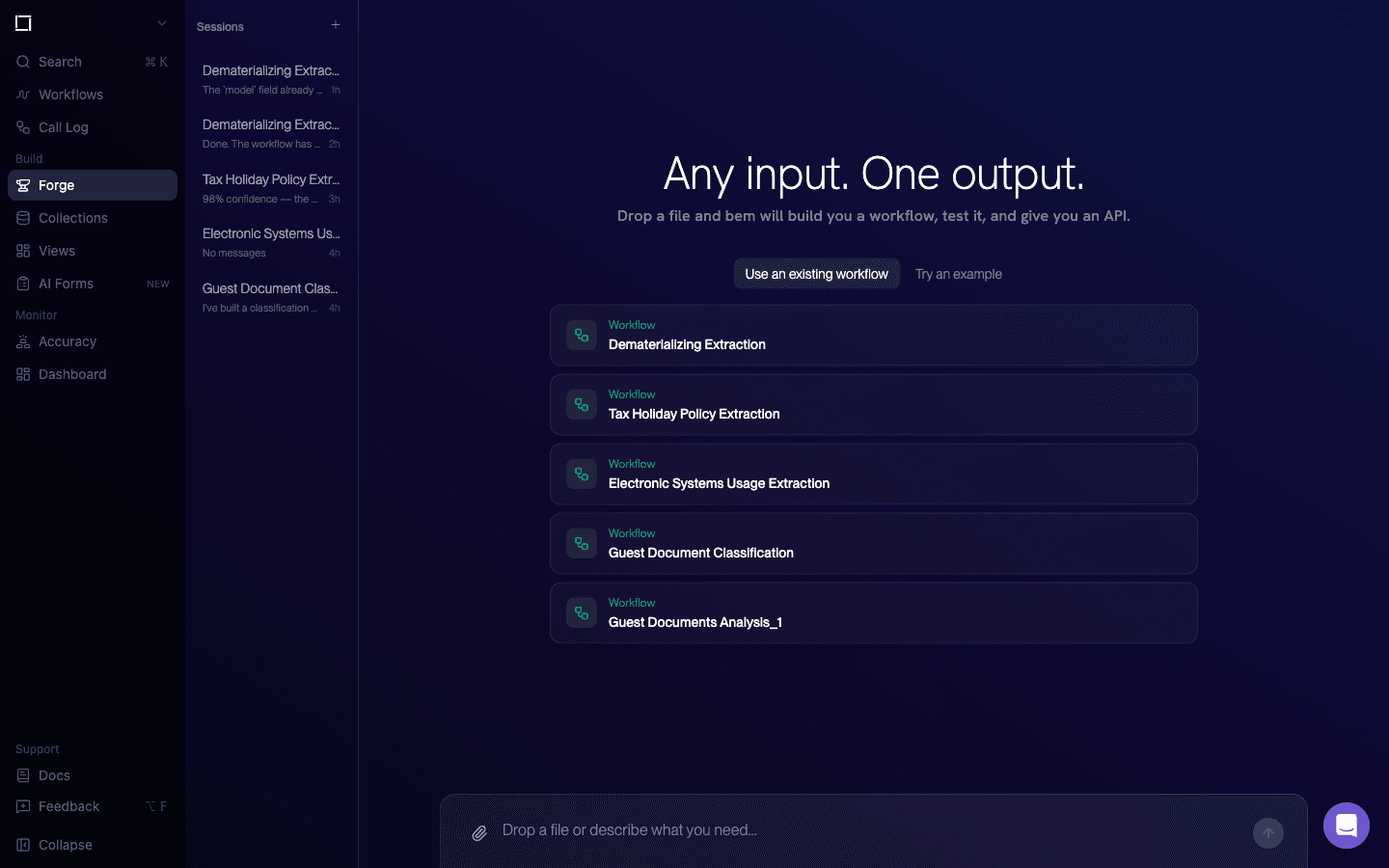
Starting points (center)
Forge shows two tabs above the main area:
- Use an existing workflow — pick one of your current workflows as a starting template. Forge will propose modifications layered on top of it.
- Try an example — browse a library of sample workflows (invoice extraction, video analysis, etc.) that you can fork into your environment.
Each row in the list shows the workflow's type, name, and a quick action to select it.
Prompt bar (bottom)
The composer at the bottom of the page accepts:
- Plain-text prompts — describe what you want bem to build. For example: "Extract line items from this invoice and classify the vendor."
- File attachments — click the paperclip, or drag a file onto the bar. Forge analyzes the document to scaffold an output schema and suggest downstream steps.
- Submit (arrow button) — runs Forge. When it finishes you land in the Workflow Editor with the generated workflow pre-populated and ready to test.
Forge is the recommended entrypoint when you have a sample document but aren't sure which function types to combine. For deterministic, code-first workflow creation, use the Workflows API directly.